The ongoing Aadhaar-mobile SIM card re-verification process has just become a little easier for people across the country. Consumers can now simply dial a central number, regardless the network, to link their mobile number with Aadhaar number. This will bring a sigh of relief for

Showing posts with label Latest Technology News. Show all posts
Showing posts with label Latest Technology News. Show all posts
Friday, January 5, 2018
Sunday, December 31, 2017
How to block emails in Gmail
Alongside Twitter trolls and auto-playing adverts, unsolicited email probably ranks highly in most people's lists of "most annoying things about the internet."
And it's not just email spam that's cluttering up your inbox. What chance do you have of maintaining a "zero inbox" philosophy if you're under a constant barrage of notification emails from Facebook, your bank, and every other site where you have an online presence?
Friday, December 22, 2017
Differences Between Virtual Reality and Augmented Reality
Virtual Reality
Virtual reality devices have exploded in popularity among tech fanatics and media fans, but the virtual world is still new for many people. Virtual reality is a computer-generated environment
Thursday, December 14, 2017
Best 4G Phones Under 10000
There was a time when 4G smartphones were a rarity in the market. Not anymore though as the Indian smartphone market is now flooded with 4G smartphones across various price segments. However, users often get confused about which smartphone to buy due to the various options available. So, here is some help. We have compiled a list of top 10 4G smartphones available in the market which you can consider buying.
Friday, November 17, 2017
WhatsApp delete for everyone feature doesn't really delete your messages: 6 things to know
WhatsApp introduced a feature that almost all of us have been waiting for a long time now. It is the "delete for everyone" feature. Befitting the name, this feature let users recall messages or in simple terms -- delete a message you sent your friend by mistake. We all must have -- oftentimes sent a
WhatsApp message by mistake -- and the delete for everyone feature is a boon to make up for such blunders. But then, now a new report claims that the delete for everyone feature doesn't really delete the sent message. So what does it really do? What it actually does is, it deletes the message from WhatsApp but saves it in the notification log of the phone -- which then can be later retrived and read by the sender.
By now, you must have already used the delete for everyone feature. WhatsApp -- earlier this month -- rolled out the feature for all Android, iOS and Windows phones users. The feature is available for users with the latest version of the messaging application -- so if you still haven't received the features -- you need to head over to Google Play store and update WhatsApp. Let's explain how the feature actually works and the trick to read the deleted message.
- If you have sent a WhatsApp message by mistake to someone -- its time for you to rejoice. Before we go on to explain how the delete for everyone feature works, it is important to note that the message (that you had sent by mistake) should be deleted within 7 minutes from the time it's sent. Coming to how the feature actually works. After sending the message by mistake -- tap, hold and select the message, click on the delete bin icon which is situated at the top of the screen. Earlier, on clicking the icon the message would automatically delete -- but not anymore. With the new feature coming in, users will get three options by clicking the delete icon -- delete for me, cancel and delete for everyone. To delete the message from your as well as the receiver's chat box -- you need to select delete for everyone option. After deleting the message you and the receiver of the message will get this message -- "this message was deleted".
- According to WhatsApp, after deleting the message, the recipient will not be able to read the message. But then, with a new report coming in, it seems the even if you delete the message -- the sender can actually read it. To read the deleted message -- you need to download a third party application called the Notification History. This third party app is available for download on Google Play store.
- To read the deleted message, first, download the Notification History application available on Play store. Now, to see the message that was sent to you on WhatsApp, but was later deleted by the sender -- you need to open the third party application and head over to the Android notification log section -- which will be available on the top right side of the app -- to read the message. But then, yes you can actually read the deleted messages -- but there are some limitations.
- The catch is, Notification History app only works on Android phones. It reportedly doesn't allow you to read more than first 100 characters of the deleted message. In simple words, if your friend had sent you a message which consists of more than 100 characters -- well, you may not able to read the whole message and may get access only to the first chunck of it -- first 100 characters only. The app saves the deleted WhatsApp messages in its notification log, however, in case you restart your device -- you may lose track of these messages. It is said that on restarting the device, the notification log will be completely refreshed.
- The third party app aka Notification History works well only on devices running on Android 7.0 Nougat. It is also noteworthy that via this app, you will only be able to retrieve the deleted text messages and no media files -- be it images, videos or any other.
- There are other ways to get access to the deleted WhatsApp messages. Things may get easy if you are a user of third-party launchers like Nova Launcher on your phone. So if you have Nova launcher on your phone -- long press on the home screen, tap on Widgets > Activities > Settings > and then head over to the Notification log section. If your device runs on stock Android then you can get access to the notification log from the Settings widget as well.
Monday, November 13, 2017
Xiaomi Redmi Y1, Redmi Y1 Lite launched: Price, specs and more

New Delhi: Chinese smartphone maker Xiaomi on Thursday launched a new smartphone series in India by unveiling two devices –Redmi Y1 and Redmi Y1 Lite.
Swipe launches 10.1-inch Slate Pro tablet at Rs 8,499
 New Delhi: Domestic handset maker Swipe Technologies on Friday launched Slate Pro tablet that comes with a 10.1-inch HD IPS display at Rs 8,499.
Packed with a powerful 5000 mAh battery, Slate Pro is exclusively available on Flipkart, the company said in a statement.
Powered by 1.1 GHz Quad-core processor, the tablet comes with 2GB RAM and 16GB in-built memory storage which is further expandable up to 32GB.
The android based tablet operates on Marshmallow 6.0. It supports 4G VoLTE with dual SIM slots and allows callings as well.
Slate Pro comes with 5MP Rear camera and 2MP front camera.
"Slate Pro has been designed for the young professional and working students. We attempt to make products which are user friendly by adding value to the consumer`s experience. Launching our products on Flipkart has always boosted our sales," said Shripal Gandhi, Founder and CEO of Swipe.
Key specs
10.1 inch HD IPS Display
Android Marshmallow OS
1.1GHz Quad core processor
2GB RAM
16GB in-built memory
32 GB expandable memory
5000 mAh battery
5 megapixel rear camera
4G VoLTE Dual sim
3.5 mm Audio connector
Sunday, November 12, 2017
Top 10 technologies that make your car smart
with the leaps and bounds being made in automotive technology, what a 2018 model-year vehicle offers in terms of in-car entertainment and assistance features should now be at the top of your list when trying to make a purchasing or leasing decision on a new car, according to the experts at Kelley Blue Book.
"Where driving dynamics, comfort and safety are concerned, modern vehicles are steadily marching down a path toward parity," said Michael Harley, group managing editor for Kelley Blue Book.
But not all technological features were created equal, and so the vehicle valuation and information service has put together what it believes will be the top 10 in-demand, car-ownership experience-improving features for the coming year and the options that will make the car more attractive than its peers when it comes to getting the best possible trade-in price down the road.
"The tech we've identified as the best for 2018 should be considered when searching for your next new vehicle. Regardless of price point, it shouldn't be too difficult to find a vehicle with most of them -- and they're all very helpful," said Harley.
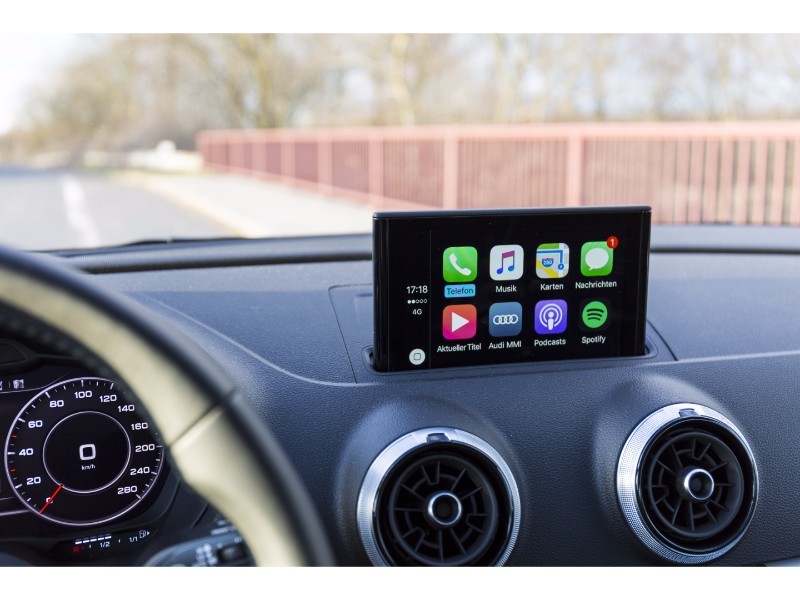
Apple CarPlay/Android Auto Compatibility
According to Strategy Analytics, most consumers in the US, Europe and China are already prepared to pay a premium to make sure their car offers full connectivity with their smartphone so that they can use its features safely while behind the wheel. Little wonder that with the exception of Toyota and Lexus, every major carmaker has now pledged support for one or both of the technologies.
Connected mobile apps
Many premium car companies already offer a smartphone companion app that lets owners remotely lock, unlock and start their car, adjust climate control or locate the vehicle in a crowded parking lot. And thanks to much of the technology behind the system being developed by an automotive supplier -- Bosch -- the features are quickly trickling down to mainstream motors.
Autonomous Emergency Braking
A host of independent studies plus data from insurance companies already proves without a shadow of doubt that this system, which monitors the car's surrounds and hits the brakes automatically to avoid a collision, whether with a pedestrian, cyclist or other vehicle, is saving lives and cutting insurance premiums. Though the feature won't be mandatory on US cars for several years, most manufacturers are already offering it as a cost option, or in the case of VW and Volvo, as standard equipment.
A 360° camera
A feature pioneered by Japanese carmakers, this camera array gives drivers a virtual birdseye view of everything around the car and displays it on the screen in the center console. It's fast becoming an option on even entry-level models.
USB ports
Drivers and passengers want to be able to charge their phones and tablets on the go and don't want to have to carry around a 12-volt adaptor and a host of cables to do so. For example, the new Ford Excursion offers seating for eight and USB ports for every single row of passengers as standard.
Teen driver technology
A huge range of vehicles, from the Ford Fiesta and Volvo XC90 to the Dodge Challenger Hellcat, offer a system where owners can program the keys so that when the car is borrowed, engine power and speed limit are capped, the distance traveled can be monitored and the sound system's volume locked down. What's more Chevrolet's system also complements these lock-down features with a report card telling worried parents if the car had to brake suddenly.
Rear cross-traffic alert
Using sensors to keep an eye on things like cars passing behind, shopping carts rolling across carparks and people walking behind the car, it makes reversing out of a space simple and safe.
Adaptive Cruise Control
US drivers in particular spend an inordinate amount of time behind the wheel, particularly in congested highway driving situations. Adaptive cruise control can automatically maintain a safe speed behind the car in front, slowing down or speeding up as gaps narrow and widen.
Lane Departure Warning
Over longer drives, it can be easy to let the mind, and as a result, the car drift. Lane departure warning systems alert the driver when he or she is straying across the line and some systems, such as in the latest Mercedes and Volvo models, can apply opposite lock to the steering wheel to automatically maintain lane discipline.
They may seem like little more than a flashy, unnecessary option, but LED lights in particular are brighter, quicker to respond and never need changing. What's more, in recent IIHS car crash and safety testing, many cars have come under criticism for the poor quality of their headlights for spotting and avoiding collisions at night time.
Free Upgrades to Windows 10 to End on December 31, Microsoft Reveals
If you use Microsoft's accessibility features and want a free upgrade to Windows 10, better hurry up because Microsoft is closing this last deal on December 31.
Microsoft mostly stopped offering free upgrades to Windows 10 in July last year but users who use accessibility features, got an extension of that promo, a report in ZDNet said on Saturday.
Accessibility features in Windows are options to help users who may have trouble using their computers normally.
In July, Microsoft announced: "We are not restricting the free upgrade offer to specific assistive technologies. If you use assistive technology on Windows, you are eligible for the free upgrade offer."
According to the report, Microsoft quietly edited that page last week and updated the original statement "We will make a public announcement prior to ending the offer" to "The accessibility upgrade offer expires on December 31, 2017".
The general 'Upgrade to Windows 10 FAQ' page was revised to include the expiration date for this offer. That page was 'last reviewed' on October 24.
Microsoft started rolling out the Windows 10 Fall Creators Update last month, bringing several new features to the platform. Alongside, the company also announced that the first mixed reality headsets were now available to buy.
The biggest change comes in the form of the Fluent Design System, reworking the way cross-platform apps look and behave on Windows 10. Also new, is Story Remix for easy video editing, a cloud-powered Clipboard, and OneDrive Files On-Demand, among other new features.
Saturday, November 11, 2017
YouTube Kids Announces New Measures to Safeguard Children From Inappropriate Videos
YouTube Kids on Friday announced new measures for parents if they find kids watching inappropriate videos at home even by mistake.
Parents can now report inappropriate videos to YouTube which will be reviewed by a policy team.
If the user is signed in while reporting a video, it will also be blocked from the YouTube Kids app, the company said in a statement.

Parents can also customise the contents in the YouTube Kids app in some countries by signing into the app and blocking videos or channels they don't want their kids to watch.
"When you block a video or channel, you will no longer see that video on the YouTube Kids apps when you are signed in. You can always clear your blocked videos and channels from Settings if you change your mind," the company said.
The in-built timer lets parents limit screen time by telling kids when it's time to stop watching. The timer will display a friendly alert and stop the app when the session is over.
Users can also create a profile for each kid and choose between younger or older content levels to manage the types of videos they can watch. Kid profiles work across all different devices.
If parents would like to restrict their child's experience to a more limited set of content, they can turn off Search using the parental settings.
"Regardless of the status of Search in your app, there is a chance that your child will find content that you don't want them to watch. If this happens, you can notify YouTube by flagging the video," the statement said.
With over 800 million learning video views per day, YouTube Kids is now live in 37 countries.
Wednesday, November 8, 2017
Nokia 5 3GB RAM variant launched in India:
Nokia 5 was announced just last month in India. The device tags a brand name that was once highly valued in the country and it still has its fill of fan following. Nokia 5 has impressive specifications for the price range it is being offered in.
Xiaomi Redmi Note 4 starts receiving Android Nougat-based MIUI 9 update
Xiaomi has finally started rolling out the Android 7.0 Nougat-based MIUI 9 update for its Redmi Note 4 smartphone in India. The smartphone was initially launched with Android 6.0 Marshmallo
w. To recall, Xiaomi had announced MIUI 9 alongside the Mi 5X in July and had detailed plans to roll out the update to all its devices. The stable version of the MIUI 9 update is being rolled out in phases and users can download it as an OTA update by checking their device's setting for the update
Subscribe to:
Posts (Atom)